Binary Search: No Memorizing, No Crying - 1
Element & Boundary Search: why <= and < are both right

Let me guess how your binary search journey went.
You watched a video. The algorithm made perfect sense. You nodded confidently, like someone who has understood everything. Then you opened your first problem and the solution had low < high. The next one had low <= high. Then high started at nums.size() instead of nums.size() - 1, and suddenly high = mid appeared, as if nobody had told you the rules had changed.
Your brain did what every brain does when it feels lost: it started memorizing. "Okay, first occurrence uses this one, lower bound uses that one..."
Yeah. I did that too. I got completely overwhelmed. And I'll save you the suspense: memorizing templates works right up until the problem wears a slightly different shirt. Then you're back to staring at the screen like it owes you money.
So here's the deal. In this series you won't memorize a single template. You'll understand why each variation exists, and then you'll be able to rebuild any of them from scratch, even at 2 AM with a deadline and no WiFi.
Binary search comes down to five patterns:

- Element Search (Exact Match)
- Boundary Search (First/Last Occurrence)
- Modified Binary Search (Rotated / Partially Sorted Arrays)
- Peak Finding / Bitonic Array Search
- Search in Answer Space
This post covers the first two. The rest get their own posts. Grab a notebook (a real one, your phone doesn't count), and let's go.
Nobody searches their contacts from the top

Say you want to call your friend Zoya. Do you start at the first contact and scroll one by one: Aaditya... Aarav... Abhishek...?
Of course not. You jump to the middle, see "M", and think "Z comes after M", so you jump into the second half. Then you land on "T", jump again, and you're on Zoya in a few moves.
Congratulations, you already do binary search in real life. You just never got a certificate for it.
Linear search is the person who scrolls from "A" every single time. We all know one of them, and we don't trust them with directions either.
So what is binary search, officially?
Given a sorted array and a target, look at the middle element:
- If it equals the target, done.
- If it's smaller than the target, the target must be on the right, so ignore the left half completely.
- If it's bigger, the target must be on the left, so ignore the right half.
Repeat until you find it or run out of elements. If the search space becomes empty, the target isn't there, and we return -1.
How good is that? For 1,000,000 elements, linear search might do up to 1,000,000 checks. Binary search does about 20. Twenty. Linear search is still on the first page while binary search has already made chai and is back.
The only idea you really need: the invariant
Here comes the one thing I want you to remember even if you forget everything else:
If the target exists, it is always inside
[low, high].
This is called an invariant: a promise the algorithm keeps on every single iteration. And unlike your friend's "bro I'm just 5 minutes away", this promise is never broken.
Every line of the code exists to keep that promise true. When arr[mid] < target, then mid and everything left of it can't be the answer, so we throw them out with low = mid + 1. The target is still inside [low, high]. Promise kept.
Now notice a small thing about high = mid - 1. It means high is a real candidate, a position that might still hold the answer. So [low, high] is a closed interval: both ends are alive. Keep this in your head, because it explains the loop condition in a minute, and it's the secret to why the other versions look different later.
"Sorted array required" is only half the story
Everyone says binary search needs a sorted array. True, but boring, and slightly wrong.
The real rule:
You must be able to look at one thing and safely throw away half the search space.
Sorted order is just the easiest way to get that guarantee. Later in the series you'll see problems with no sorted array at all, where a simple yes/no condition gives the same power. That's Binary Search on Answer, and when it clicks you'll feel like you've been handed a cheat code.
The code
int binarySearch(const vector<int>& arr, int target) {
    int low = 0, high = (int)arr.size() - 1;
    while (low <= high) {
        int mid = low + (high - low) / 2;
        if (arr[mid] == target) return mid;
        if (arr[mid] < target) low = mid + 1;
        else high = mid - 1;
    }
    return -1;
}
Barely ten lines. Type it yourself. I know your Ctrl+C is faster than your brain, but today we're fixing that.
Two tiny details that stop real bugs:
mid = low + (high - low) / 2instead of(low + high) / 2. If both are huge, adding them can overflow the integer range. This version never does. Fun fact: this exact overflow bug sat in Java's standard library for years before it was caught. If it can fool the people who wrote Java, it can fool you at 1 AM.(int)arr.size() - 1instead ofarr.size() - 1.size()is unsigned, so on an empty vectorsize() - 1doesn't give-1. It wraps around to a gigantic number. Storing it straight into aninthappens to turn it back into-1on most compilers, so you can get away with it. But changehightosize_t, or compare it against another unsigned value, and the loop runs wild and reads memory that isn't yours. The cast says "I want a signed number here" out loud, and that's a habit worth having.
Watch it work: target found
Array:  [1, 3, 5, 7, 9, 11, 13]
Target: 9
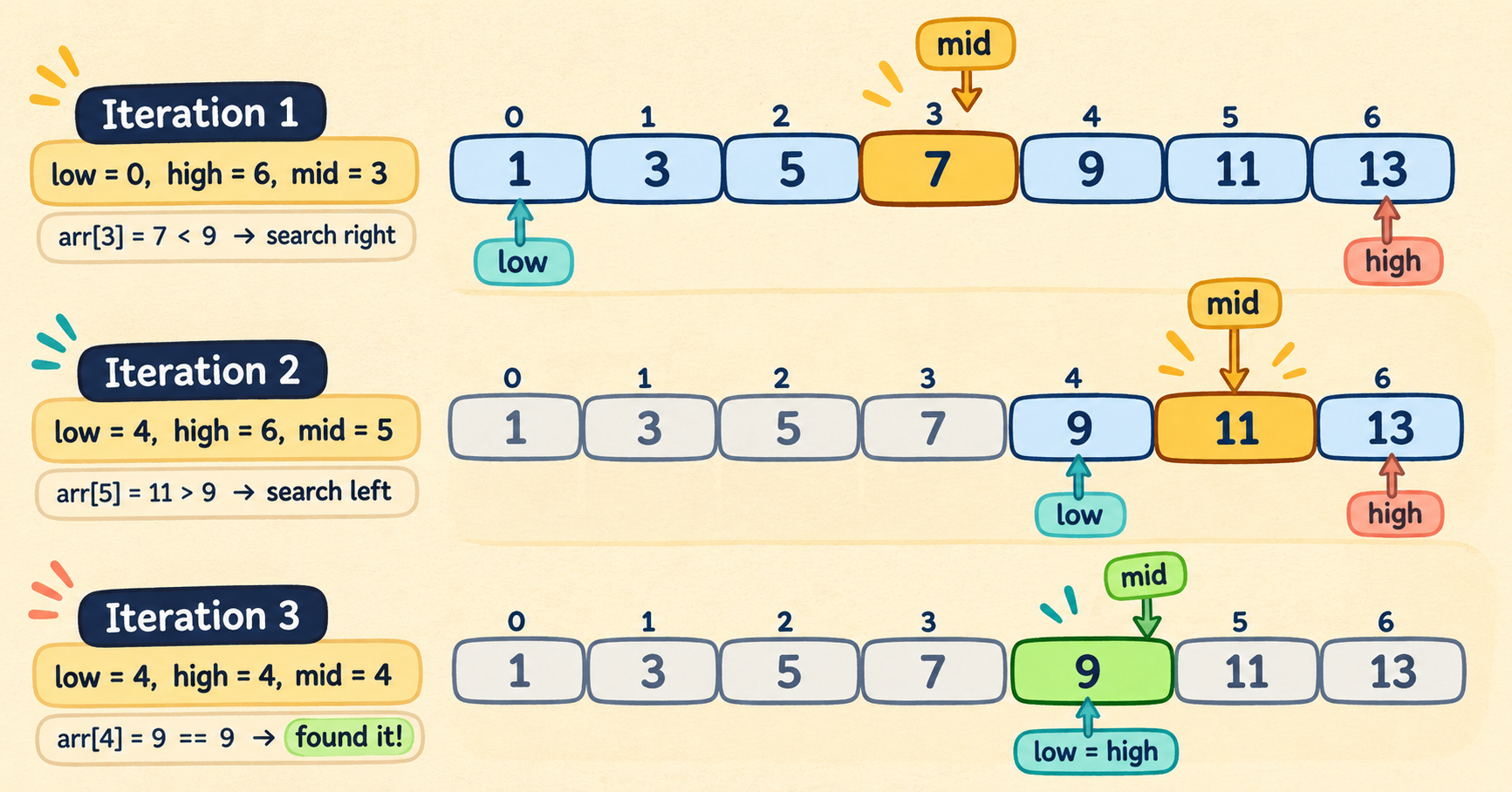
| Iteration | low | high | mid | arr[mid] | What happens |
|---|---|---|---|---|---|
| 1 | 0 | 6 | 3 | 7 | 7 < 9, so target is on the right: low = 4 |
| 2 | 4 | 6 | 5 | 11 | 11 > 9, so target is on the left: high = 4 |
| 3 | 4 | 4 | 4 | 9 | Found it at index 4 |
Look at iteration 3 again. low and high are equal, and there's still one element left to check. Put a pin in that. It's about to matter.
Watch it work: target NOT found
Same array, but now we hunt for 6, which does not exist. No amount of staring will make it appear. (Yes, like when you keep opening the fridge hoping something new showed up.)
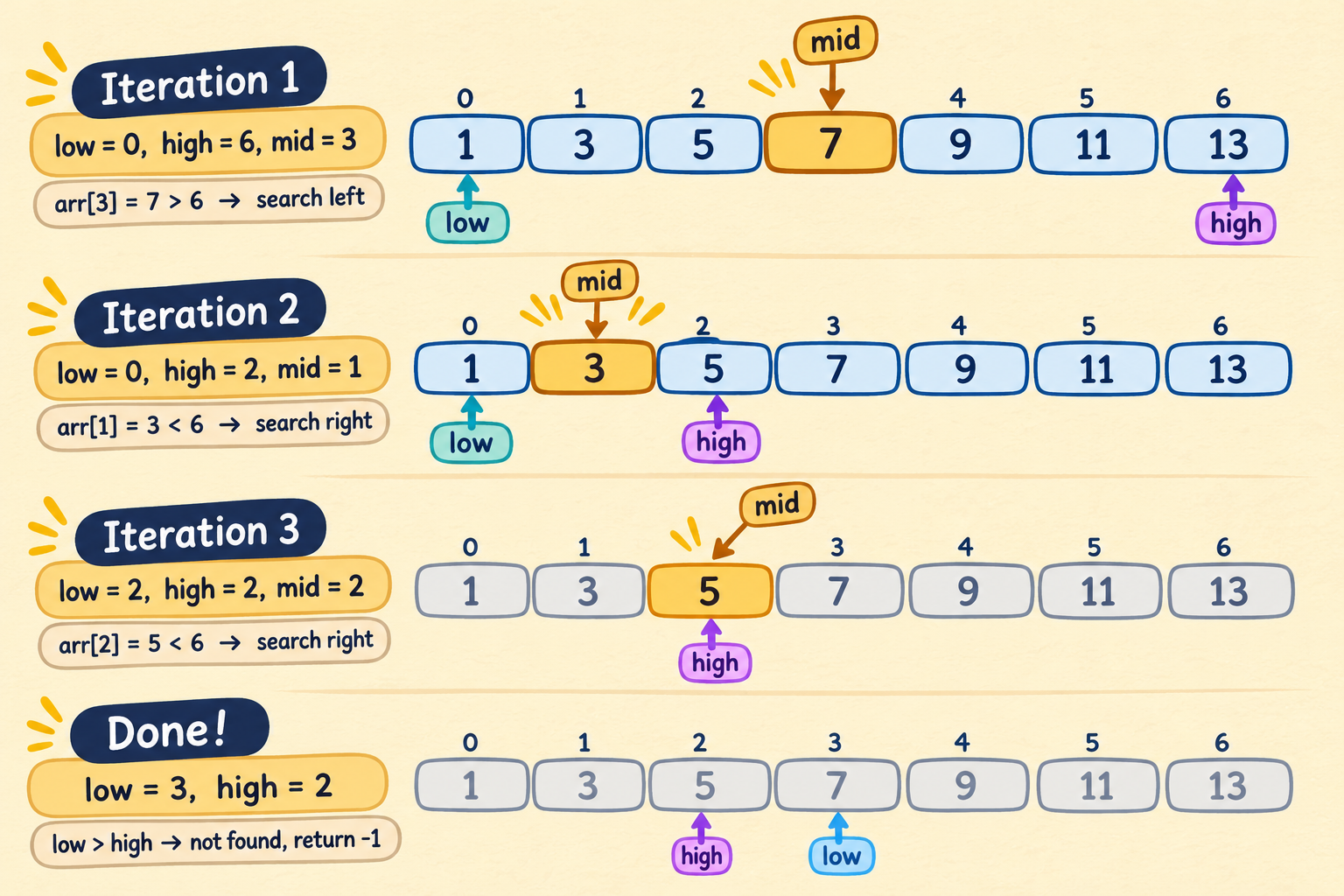
| Iteration | low | high | mid | arr[mid] | What happens |
|---|---|---|---|---|---|
| 1 | 0 | 6 | 3 | 7 | 7 > 6, so high = 2 |
| 2 | 0 | 2 | 1 | 3 | 3 < 6, so low = 2 |
| 3 | 2 | 2 | 2 | 5 | 5 < 6, so low = 3 |
Now low = 3 and high = 2. The pointers have crossed: nothing is left to check. The loop ends and we return -1. That's how binary search knows the target isn't there. It doesn't give up. It simply runs out of places to look.
Quick pause. Try this before scrolling: what does the code return for an empty array []? Think for ten seconds. Don't scroll down yet. I can see you. Backbenchers always peek at the answers first.
(Answer: high becomes -1, so low <= high is 0 <= -1, which is false. The loop never runs and we return -1. If you got it right, nice. If not, that's exactly why we're here.)
The great low <= high vs low < high mystery
If you've ever changed < to <= and prayed, this section is your intervention.
This one confused me the most, and the invariant solves it in seconds.
Take arr = {10, 20, 30} and target = 30. After one step we're at low = 2, high = 2. One element left, and it's the one we want.
If the condition is low < high, the loop looks at equal pointers, decides "we're done here" and leaves, without ever checking that last element. We return -1, and the answer was standing right there.
With low <= high, the loop continues, because [2, 2] is a closed interval with a live candidate in it. This is the idea from earlier: high is inclusive, so equal pointers still mean there's something left to check.
So the <= was never random. It came straight from how we defined the interval. (Remember this, because I'm about to use it against you. Lovingly. And if you forget, you owe me a chai.)
How fast is it, really?
Each iteration halves the search space. So the real question is: how many times can you halve n before only one element is left? About log₂(n).
| Array size | Linear Search (worst) | Binary Search (worst) |
|---|---|---|
| 1,000 | 1,000 checks | ~10 iterations |
| 1,000,000 | 1,000,000 checks | ~20 iterations |
| 1,000,000,000 | 1,000,000,000 checks | ~30 iterations |
A billion elements in about 30 steps. Your phone takes longer to load a reel.
Time complexity: O(log n). We drop the base of the log because logs of different bases differ only by a constant factor, and Big-O doesn't care about constants. (Big-O is a bit like me: big-hearted enough to ignore the spare change you borrowed from me.)
Space complexity: O(1) for the iterative version. We only use low, high, and mid. A recursive version uses O(log n) for the call stack.
Okay, you're feeling confident. Good. Now the truth bomb.

At this point you understand binary search. You can explain it, dry-run it, even defend <= in an argument. Be proud, you earned it.
Now go solve a real problem and watch me ruin your day.
Our code finds an index where the target lives. Not necessarily the first one.
Try [1, 2, 2, 2, 3] with target 2. The first mid is index 2, it matches, and we happily return 2. But the first occurrence is index 1. We never even looked there.
Think of your contacts again. You have three people saved as "Rahul": Rahul College, Rahul Gym, and Rahul Don't Pick Up. If you want the first Rahul, stopping at the first one you stumble on isn't good enough. You need a different way of thinking about the search.

And here's the other truth bomb: binary search is famous for being easy to explain and hard to write correctly. People who've been coding for years still slip on those boundary conditions. So if you're making bugs here, you aren't bad at this. You're exactly on schedule.
Boundary Search
Until now we used binary search for exact match: find the target, then stop.
Boundary search asks a different question: where does something begin or end? Where's the first 2? The last 2? The first element that's greater than or equal to some value?
Broadly, boundary search comes in two flavours: lower bound and upper bound. To understand them, I'm dragging you back to school.
The backbencher's guide to boundaries
Let's be honest: you were a backbencher. Don't deny it. Your last-page doodles are the evidence. So this one's for you.
It's assembly time, and 7 students are already lined up by height, because school has never heard of freedom:
Index:   0    1    2    3    4    5    6
Height: 150  155  160  160  160  165  170
You're 160 cm, and (shocker) you're late. You need to slip into the line without breaking the height order. Your life goal hasn't changed since class: stay as far from the teacher as possible.
Scenario 1: The teacher is at the end of the line. You want maximum distance, so you go to the earliest spot that keeps the order: right in front of the first 160 cm student, index 2.

Scenario 2: The teacher is at the front of the line. Same goal, opposite direction. You go to the latest legal spot, right behind the last 160 cm student: index 5.

Standing anywhere from index 2 to 5 keeps the line sorted, so you have four legal spots. But you're a backbencher, so you'll always pick an edge. Boundary search finds those two edges. That's all it does.
- Lower bound: the smallest index where the element is greater than or equal to the target. (Scenario 1, index 2)
- Upper bound: the smallest index where the element is strictly greater than the target. (Scenario 2, index 5)
If every element is smaller than the target, both bounds return n, the length of the array: the spot right behind the last student. (Upper bound also returns n when everyone is smaller than or equal to the target, since nobody is strictly taller.)
Seeing it on an array
arr = [1, 2, 2, 2, 4, 5, 8]
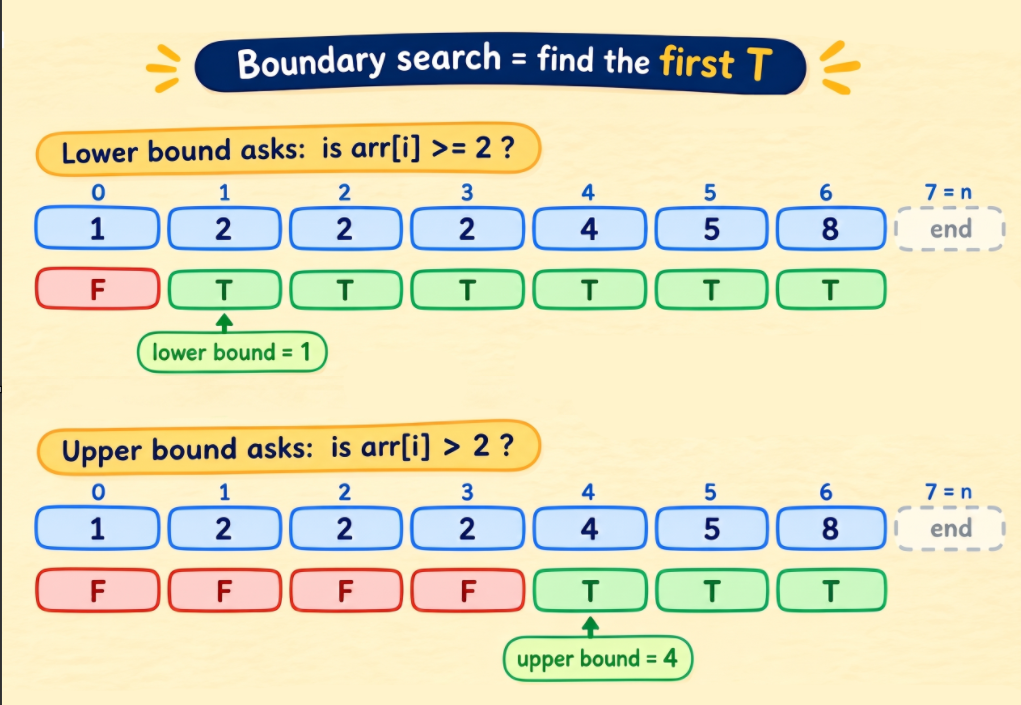
| Target | In the array? | Lower bound | Upper bound |
|---|---|---|---|
| 2 | Yes | 1 (the first 2) | 4 (the value 4, first element > 2) |
| 3 | No | 4 (the value 4, first element ≥ 3) | 4 (the value 4, first element > 3) |
Two things worth noticing:
- When the target is absent, both bounds are equal. The zone has zero width: there's nowhere to stand among equals, because there are no equals.
- When the target is present,
upper bound - lower boundis the number of occurrences. Here, 4 - 1 = 3 twos.
Remember the three Rahuls in your contacts? The first Rahul is the lower bound. The last Rahul is the upper bound minus 1. How many Rahuls you have is upper bound minus lower bound. Duplicates problem, solved.
The one picture behind boundary search
Before any code, here's the trick that makes all of this click. Pick a yes/no question, ask it about every element, and write the answers in a row.
Lower bound's question: "Is this element ≥ target?" With target = 2:
Index:    0  1  2  3  4  5  6
Value:    1  2  2  2  4  5  8
>= 2 ?    F  T  T  T  T  T  T
             ^ lower bound = 1
Upper bound's question: "Is this element > target?" Same target:
Index:    0  1  2  3  4  5  6
Value:    1  2  2  2  4  5  8
> 2 ?     F  F  F  F  T  T  T
                   ^ upper bound = 4
Because the array is sorted, the row always looks like F F F ... T T T. It never goes T then back to F. And once you see that, boundary search is just one job: find the first T. Lower bound and upper bound are the same algorithm asking different questions. (If every answer is F, there's no T to point at, so the answer is n, the spot behind the last element.)
This is also why binary search works here at all. Look at one element: if it says F, everything to its left is F too, so throw the left side away. If it says T, everything to its right is T too, so throw the right side away (but keep this one, it might be the first T). That's the same "throw away half" rule from earlier, and it's the exact idea that will power Binary Search on Answer later in the series, where there's no array at all, just a yes/no question.
Lower bound, line by line
int lowerBound(const vector<int>& arr, int target) {
    int low = 0, high = (int)arr.size();
    int ans = (int)arr.size();
    while (low < high) {
        int mid = low + (high - low) / 2;
        if (arr[mid] >= target) {
            ans = mid;
            high = mid;
        } else {
            low = mid + 1;
        }
    }
    return ans;
}
Here ans is our best answer so far. Look at the middle element and ask the T/F question: is arr[mid] >= target?
T:midis a possible answer, so we note it down:ans = mid. But an earlier index might qualify too. So we can't return yet, and we can't throwmidaway either, because it might be the earliest one. We keepmidand discard everything to its right:high = mid.F:midis too short, and so is everything to its left. None of them can be the answer, solow = mid + 1.
Why does ans start at n? Because if no element ever passes the test, nobody in the line is tall enough, and the answer is the spot right behind the last student: index n.
Notice something different from exact search: there's no "found it!" moment. We keep shrinking until low and high meet, and ans holds the last answer that passed the test. (Fun detail: when the loop ends, ans, low and high are all the same number. We keep ans because it says out loud what we're tracking.)
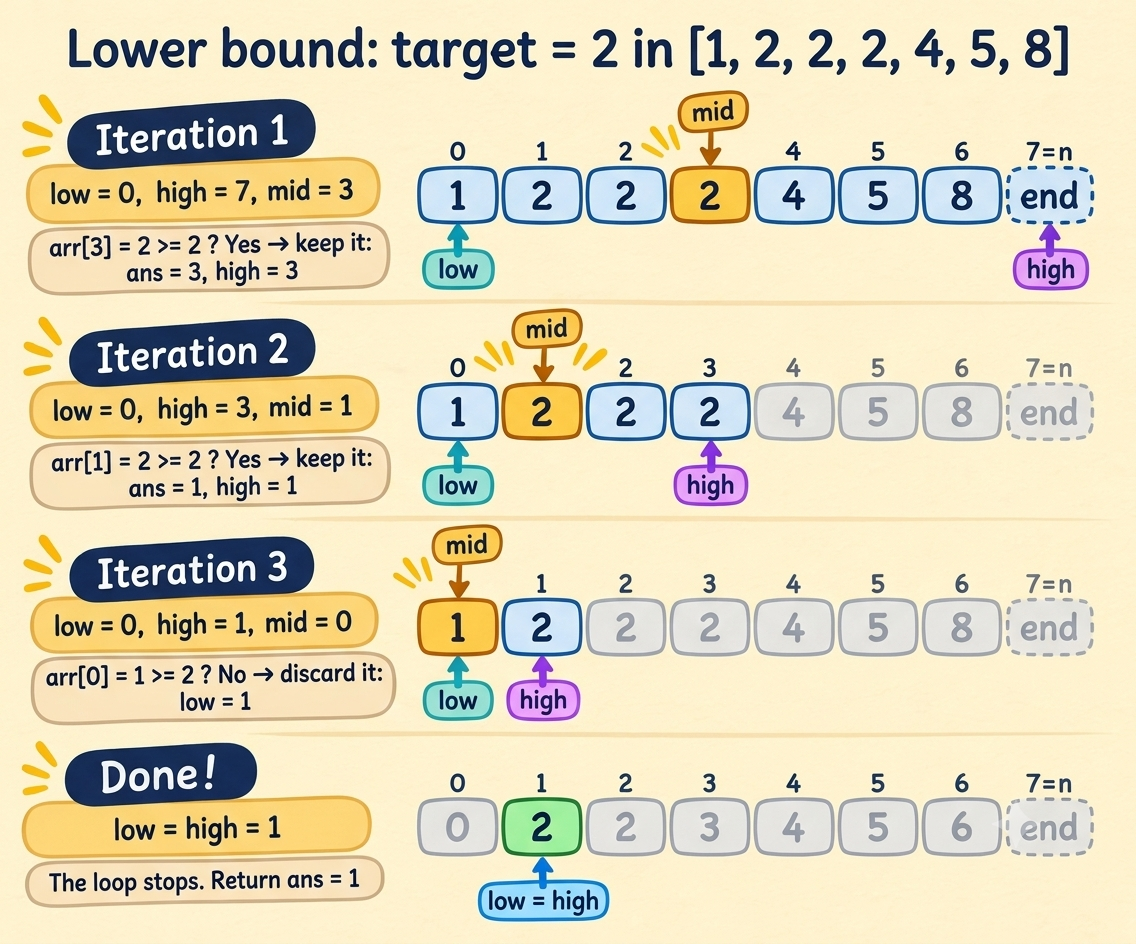
Let's dry-run target = 2 on [1, 2, 2, 2, 4, 5, 8]:
| Iteration | low | high | mid | arr[mid] | What happens | ans |
|---|---|---|---|---|---|---|
| Start | 0 | 7 | 7 | |||
| 1 | 0 | 7 | 3 | 2 | 2 >= 2, so ans = 3, high = 3 |
3 |
| 2 | 0 | 3 | 1 | 2 | 2 >= 2, so ans = 1, high = 1 |
1 |
| 3 | 0 | 1 | 0 | 1 | 1 < 2, so low = 1 |
1 |
Now low == high == 1. The loop stops and we return ans, which is 1, the first 2.
Look at iteration 1. mid landed on a 2 at index 3 and exact search would have returned right there. Lower bound shrugs and keeps going, because it wants the first one.
One gotcha: lower bound returns a position, not a yes/no. For target = 3 it returned 4, the spot where 3 would go. To check whether the target is really present, test idx < n && arr[idx] == target.
Pause and try: what does lowerBound return for target = 9 and target = 0 on this array? No peeking. Yes, you, in the last row. (Answers: 7 and 0. Nothing is ≥ 9, so we get n. Everything is ≥ 0, so we get the very first spot.)
Now you're probably wondering about low < high, high = arr.size() and high = mid. Just be calm and hold your veins. We'll crack all three right after upper bound, because seeing the two side by side is when it finally clicks.
Upper bound, line by line
int upperBound(const vector<int>& arr, int target) {
    int low = 0, high = (int)arr.size();
    int ans = (int)arr.size();
    while (low < high) {
        int mid = low + (high - low) / 2;
        if (arr[mid] > target) {
            ans = mid;
            high = mid;
        } else {
            low = mid + 1;
        }
    }
    return ans;
}
Spot the difference from lower bound? Go on, I'll wait.
It's one character: >= became >. Same loop, same updates, same ans, and you've just built a completely different concept.
The question we ask is now: is arr[mid] > target?
T:midis strictly taller than you, so it's a possible answer:ans = mid. An earlier index might qualify too, so we keepmidand discard everything to its right:high = mid.F:midis not taller than you (it's shorter or the same height). It isn't an answer and neither is anything to its left, solow = mid + 1.
That second bullet is the whole trick. Students exactly your height count as "not taller", so you walk right past them and stand behind the last one. Classic backbencher move: Scenario 2.
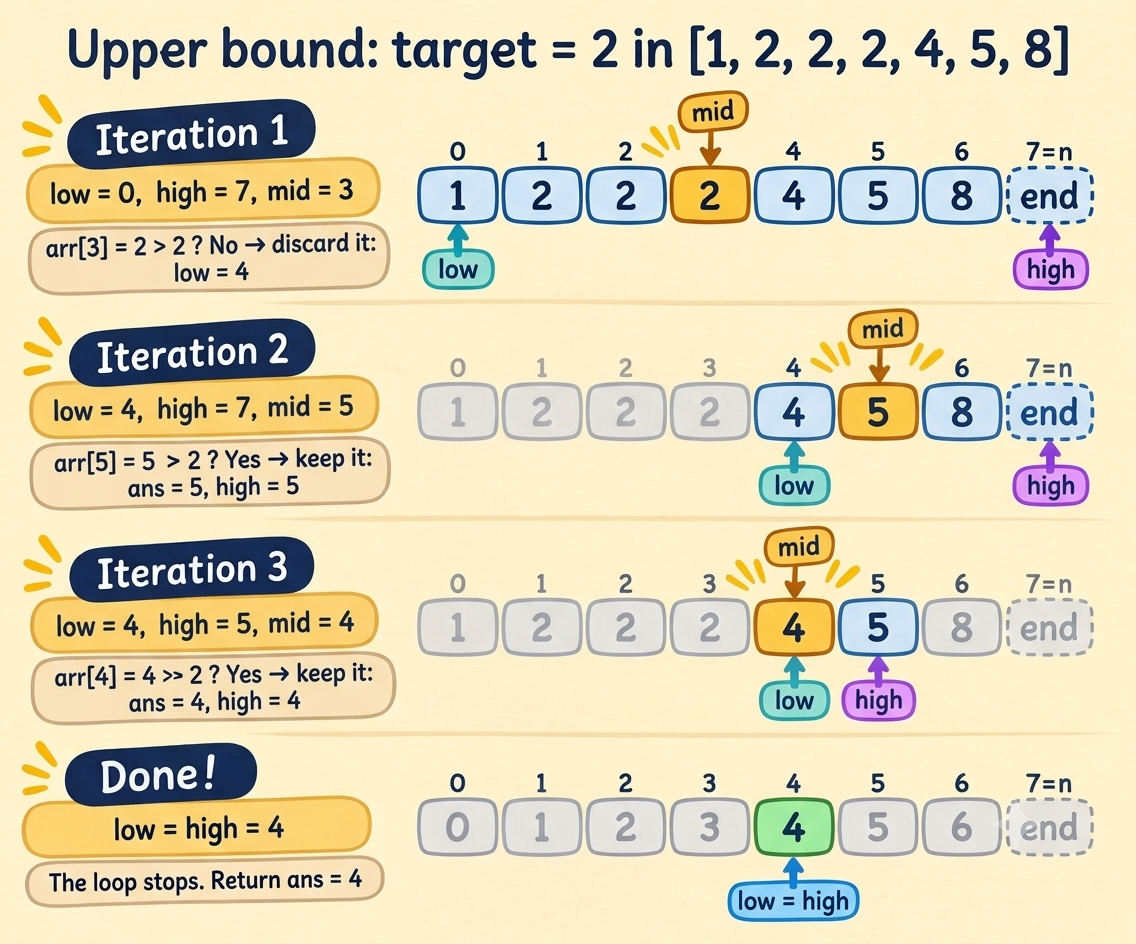
Let's dry-run target = 2 on [1, 2, 2, 2, 4, 5, 8]:
| Iteration | low | high | mid | arr[mid] | What happens | ans |
|---|---|---|---|---|---|---|
| Start | 0 | 7 | 7 | |||
| 1 | 0 | 7 | 3 | 2 | 2 is not > 2, so low = 4 |
7 |
| 2 | 4 | 7 | 5 | 5 | 5 > 2, so ans = 5, high = 5 |
5 |
| 3 | 4 | 5 | 4 | 4 | 4 > 2, so ans = 4, high = 4 |
4 |
Now low == high == 4. The loop stops and we return ans, which is 4, the first element strictly greater than 2.
Compare iteration 1 with lower bound's iteration 1. Same mid, same value 2, but lower bound went left and upper bound went right. Equal elements are the only place the two disagree, and that's the entire difference between them.
The mystery, solved
Remember I told you to hold your veins? You held them. Good. Time to pay off the promise.
All three weird things (high = arr.size(), low < high, high = mid) come from one change of meaning:
In exact search,
[low, high]holds positions to inspect. In boundary search,[low, high]holds possible answers.
And in terms of the F F F T T T row from earlier, the promise looks like this: everything left of low is F, everything from high onward is T, and the first T is trapped somewhere in between. Every update keeps that promise true.
And that second one is a bigger set than you'd think. Let's see why.
1. Why high = arr.size()
In exact search, low and high are positions we might look at, so every value had to be a valid index. That's why high started at n - 1.
In boundary search we're not hunting for an element. We're hunting for a position to return, and there's one more legal answer than there are elements: n, the spot behind the last student. It's what you get when nobody qualifies. So the possible answers are 0 through n, and high has to start at n.
"But won't that read arr[n] and crash?" Nope. high is never read as an element, it's only a candidate answer. And inside the loop we have low < high, so mid is always strictly less than high, which means mid never goes past n - 1.
2. Why low < high
Two reasons, and the second one is a classic bug.
Reason 1: when low == high, the work is done. Our interval holds possible answers, not elements. If low and high meet, exactly one possible answer is left, and that's the answer. There's nothing left to check. (In exact search, equal pointers still left one element to inspect. That's why that version needed <=. Remember that? Or am I gonna get a chai?)
Reason 2: <= would break things. Take arr = [2, 3, 5, 7, 11] and target = 15:
low = 0, high = 5:mid = 2, 5 < 15, solow = 3low = 3, high = 5:mid = 4, 11 < 15, solow = 5- Now
low == high == 5
With low <= high, the loop would run once more, compute mid = 5, and read arr[5], which doesn't exist. In C++ that's undefined behaviour, not a friendly error message.
And if you ever wrote <= together with high = mid, you'd also get the classic infinite loop: once low == high and mid passes the test, high = mid changes nothing, and the loop spins forever. If your code hung and you blamed the judge's server, this was probably it.
3. Why high = mid and not mid - 1
In exact search, whenever we moved a pointer, mid had just been rejected: it wasn't the target, so throwing it away was safe (mid + 1 or mid - 1).
In boundary search, we move high when mid passes the test. It's a valid answer, maybe even the answer. Throwing it away with mid - 1 could throw away the very spot we're looking for. So we keep it: high = mid.
The rule to remember isn't a rule at all, just common sense:
If
midfails, discard it. Ifmidpasses, keep it.
The whole thing in one table
| Exact search | Boundary search | |
|---|---|---|
What is [low, high]? |
Positions to inspect | Possible answers (0 to n) |
high starts at |
n - 1 |
n |
| Loop runs while | low <= high |
low < high |
mid fails |
Discard it (mid ± 1) |
low = mid + 1 |
mid passes |
Return it | Note it and keep it: ans = mid, high = mid |
Notice that you didn't have to memorize any of this. Every row follows from the first one. Change what [low, high] means, and everything else changes with it. That's exactly what I promised you at the start.
Plot Twist: Boundary Search Can Use <= Too

Right after learning all this, I felt unstoppable. Confident, high on dopamine, solving boundary problems one after another.
Then I hit one I couldn't crack, so I peeked at the solution. And there it was, in a boundary search problem: low <= high.
The famous GTA meme hit me: "Oh sh*t ,here we go again." I was back where I started.
Then it clicked. The solution wasn't wrong and neither was mine. It was a different style of the same algorithm, and I had only learned one of them.
The other style
If you use low <= high, then [low, high] goes back to meaning positions still to inspect, so exactly three things change, and they change together:
highstarts atn - 1instead ofn- the loop becomes
low <= highinstead oflow < high high = mid - 1replaceshigh = mid
Here's lower bound in this style:
int lowerBound(const vector<int>& arr, int target) {
    int low = 0, high = (int)arr.size() - 1;
    while (low <= high) {
        int mid = low + (high - low) / 2;
        if (arr[mid] >= target) high = mid - 1;
        else low = mid + 1;
    }
    return low;
}
The low < high style |
The low <= high style |
|
|---|---|---|
high starts at |
n |
n - 1 |
| Loop runs while | low < high |
low <= high |
mid passes |
ans = mid, high = mid |
high = mid - 1 |
mid fails |
low = mid + 1 |
low = mid + 1 |
| Returns | ans (or low, same value) |
low |
Two things to notice:
- The three changes travel as a package. Take
low <= highbut keephigh = mid, and you're back to the infinite loop from earlier. Takehigh = nwithlow <= high, and you readarr[n]. Pick a style and keep all of it. ansis optional. When the loop ends,lowis sitting on the answer, soreturn lowworks in both styles. In thelow <= highcode above I droppedansentirely. A passingmidgets discarded byhigh = mid - 1, butlowkeeps creeping up until it lands right on it. In the earlierlow < highcode I keptansbecause it says out loud what we're tracking.
So what's the real lesson?
Not "memorize both styles". It's the opposite. If you understand what [low, high] means, you can write whichever style you like and know it's right, because the rest follows from that one decision.
By convention, a lot of people use the low < high style for boundary search. So that's the style I'll use in this series, and you only have to hold one in your head.
Practice problems
Try them yourself first. I'll know if you peek. (I won't. But your conscience will, and it sits in the front row.)
Ordered from easy to hard:
- Binary Search (LeetCode 704): the plain exact-match template from the first half of this post. Warm-up.
- Search Insert Position (LeetCode 35): "where would this go?" is lower bound wearing a disguise.
- Find Smallest Letter Greater Than Target (LeetCode 744): upper bound, but with letters. Read what happens when nothing is greater.
- Count Occurrences in a Sorted Array (GeeksforGeeks): remember the Rahul counter? Upper bound minus lower bound.
- Find First and Last Position of Element in Sorted Array (LeetCode 34): both bounds in one problem, plus the "is it even there?" check from the gotcha above.
Next up: Binary Search on rotated and partially sorted arrays, where the array is "sorted-ish" and your confidence will be tested again. See you there.
Comments
Join the discussionNo comments yet. Be the first to comment.
Binary Search: No Memorizing, No Crying
Binary search is easy to explain and weirdly hard to write. One solution uses low <= high, another uses low < high, and nobody tells you why. This series builds the 5 patterns from scratch so you can rebuild any version yourself, even at 2 AM. No memorizing, no crying.